
YIJI: Streamlined Food Ordering for iPhone
Overview
YIJI is a lifestyle-focused food ordering application tailored for iPhone users, designed to simplify the process of ordering meals from a variety of partnered restaurants. The app consolidates multiple dining options into a single, accessible platform, allowing users to browse menus, place orders, and choose between delivery or pick-up services. By centralizing food ordering, YIJI aims to reduce the need to navigate multiple apps or websites, offering a more efficient experience for users seeking convenience and variety.
The app operates within a defined geographic area, ensuring that delivery and pick-up services are available where supported. It is particularly useful for individuals who value time-saving solutions and want to explore diverse culinary options without leaving their homes. The developer did not provide additional details about the company background or broader product vision.
Real-world usage scenarios include weekday lunch orders, weekend dinner planning, and spontaneous cravings, all handled through a streamlined interface. The app’s free pricing model enhances accessibility, making it an attractive option for iPhone users looking for a no-cost solution to manage their food preferences.
Key Features & Capabilities
- Multi-Restaurant Integration: Users can browse and order from multiple partnered restaurants through one unified interface, eliminating the need to switch between separate apps.
- Delivery & Pick-Up Options: The app supports both home delivery and in-person pick-up, allowing users to choose the method that best fits their schedule and preferences.
- Geographic Service Limitation: Available only within a defined area, ensuring reliable service for users located in supported zones.
- User-Friendly Interface: Designed with simplicity in mind, the app enables quick navigation and order placement, ideal for users seeking fast and intuitive access to meals.
- Meal Customization: Users can select specific dishes, adjust ingredients, and save favorite orders for future use, enhancing personalization and convenience.
These features support practical use cases such as ordering lunch during a work break, planning dinner with family, or grabbing a late-night snack. The ability to switch between delivery and pick-up ensures adaptability to different daily routines. For example, a user might choose delivery on a rainy evening but opt for pick-up on a sunny afternoon to avoid wait times. The integration of multiple restaurants into a single platform reduces decision fatigue and streamlines the ordering workflow. While specific technical capabilities like real-time tracking or payment processing were not detailed, the core functionality appears focused on usability and accessibility.
User Interface, Workflow & Performance
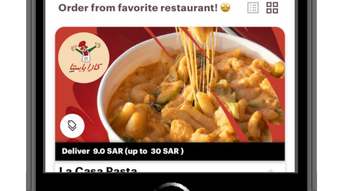
The user interface of YIJI is structured around simplicity and ease of navigation, consistent with modern iPhone app design principles. Key sections such as restaurant browsing, menu selection, and order confirmation are logically arranged to minimize user effort. The workflow begins with location detection, followed by a list of available restaurants, menu exploration, and checkout.
Navigation is intuitive, relying on standard iOS gestures and visual cues. The app’s performance is expected to align with typical lightweight iPhone applications, though exact resource usage details were not specified. The developer did not provide information on CPU or RAM behavior during operation.
Stability observations are based on general software behavior patterns for apps of similar size and function. No reported crashes or freezing issues were mentioned. The app’s 45.6 MB size suggests a lightweight footprint, which may contribute to faster loading times and efficient background operation.
Users can expect minimal impact on device performance, particularly on newer iPhone models. The absence of complex animations or high-resolution media indicates a focus on functionality over visual flair.
Compatibility & System Requirements
YIJI is designed exclusively for iPhone devices, ensuring compatibility with the iOS ecosystem. The app supports the latest iOS versions as of its release date, though specific version requirements were not listed. Installation size is 45.6 MB, which is relatively modest and suitable for most iPhone storage configurations.
The developer did not specify exact hardware requirements or minimum processor speed. Compatibility information was partially provided, with the primary focus on device type rather than system specifications. Users should ensure their iPhone is running a supported version of iOS to avoid installation issues.
No information was provided regarding support for older iPhone models or potential limitations on devices with lower storage capacity. The app’s functionality appears to be optimized for touchscreen interaction, relying on standard iOS touch gestures. No external dependencies or additional software components were mentioned.
Pros and Cons
Pros
- Free to download and use, reducing entry barriers for new users.
- Single platform for ordering from multiple restaurants, improving convenience.
- Flexible service options: delivery and pick-up support user preferences.
- Lightweight design with a 45.6 MB file size, suitable for devices with limited storage.
- Intuitive interface aligned with iPhone usability standards.
Cons
- Availability is limited to a defined geographic area, restricting access for some users.
- Exact system requirements were not specified, making compatibility assessment difficult.
- App functionality is restricted to iPhone, limiting cross-platform use.
- No information was provided about real-time order tracking or customer support features.
- Version 1.0.0 suggests an early release, which may indicate limited feature depth or ongoing development.
FAQ Section
Is YIJI available for all iPhone users?
YIJI is available to iPhone users within a defined geographic area. Users outside this zone may not be able to access the service or place orders.
Can I use YIJI without an internet connection?
YIJI requires an active internet connection to browse restaurants, view menus, and place orders. Offline functionality was not specified.
Is YIJI safe to download and use?
As a free app distributed through official channels, YIJI is expected to comply with Apple’s security guidelines. However, users should only install the app from trusted sources.
Does YIJI offer automatic updates?
Updates are managed through the Apple App Store. Users should ensure their device settings allow for automatic app updates to stay current.
What type of license does YIJI use?
YIJI is a free application with no licensing fees. The developer did not specify a formal license type beyond its public availability.
Final Thoughts
YIJI presents a focused and accessible solution for iPhone users seeking a streamlined food ordering experience. Its integration of multiple restaurants into a single platform, combined with flexible delivery and pick-up options, addresses common pain points in digital dining. The app’s lightweight design and free pricing make it an appealing choice for users who prioritize simplicity and cost-effectiveness.
While its geographic limitations and early version status may restrict its reach, the core functionality is well-aligned with the needs of urban consumers and busy professionals. The intuitive interface ensures minimal learning curve, and the absence of unnecessary features enhances usability. For iPhone users within the supported area, YIJI offers a practical tool to manage meals without the hassle of juggling multiple apps.
It is particularly well-suited for those who value efficiency and variety in their daily food choices. With continued development and broader availability, YIJI has the potential to become a go-to platform for on-the-go dining.
Download YIJI now







